Think of your business as a high-performance car. The engine is your CRM—it's where all the customer knowledge lives, from the first hello to the latest support ticket. But an engine on its own doesn't go anywhere. You need a way to turn that power into motion.
That's where Flutterwave comes in.
Integrating Flutterwave with your CRM is like adding a perfectly tuned fuel injection and transmission system. It takes all that potential sitting in your customer relationships and smoothly converts it into revenue. This guide is all about how that combination creates one unified system to manage both relationships and payments, which is a game-changer for businesses in Africa's fast-moving markets.
The New Engine for African Business Growth
For too many businesses across Africa, operations are fragmented. You’ve got customer data sitting in one spreadsheet, sales conversations in another, and payment records tucked away somewhere else entirely. This disconnect is a huge drag on growth. A CRM with Flutterwave tackles these problems head-on.
- It brings everything together: Sales chats and payment history, all in one place. You get the full story of every customer, not just bits and pieces.
- It puts busywork on autopilot: Forget manually chasing payments or updating invoices. The system handles it, freeing up your team for more important things.
- It gets you paid faster: By making it ridiculously easy for clients to pay right away, the gap between sending an invoice and seeing the money in your account shrinks dramatically.
The real magic is in how it handles local payments. Flutterwave supports everything from M-Pesa to bank transfers and USSD, so you can meet customers using the payment methods they already know and trust.
At the end of the day, this isn't just about bolting two tools together. It's about building a smarter, leaner business. The ability to manage fast and cost-effective cross-border payments is essential, but combining that with your customer data is what truly fuels growth. This unified approach is the foundation for better decisions, quicker payments, and stronger, more profitable customer relationships.
How CRM and Flutterwave Work Together
To get a real sense of how a CRM and Flutterwave join forces, let's start with a simple analogy.
Picture your CRM as a detailed customer diary. It's meticulously tracking every conversation you have, every preference they mention, and every single interaction along the way. Now, think of Flutterwave as the secure, hyper-efficient cashier who handles all the money stuff, navigating Africa’s diverse payment landscape with ease.
An integration is what builds the seamless bridge connecting the diary to the cashier. When a customer pays an invoice using a Flutterwave link that your CRM generated, that payment information is instantly sent back. The "diary entry" for that customer gets updated automatically to show the payment, which means no more manual data entry and no more costly human errors.
This direct link ensures your customer records always show their complete financial history right alongside their relationship history. You get a single, truly unified view of every customer.
This simple workflow is surprisingly powerful. As the diagram below shows, combining your CRM with your payment processing is a direct line to business growth.
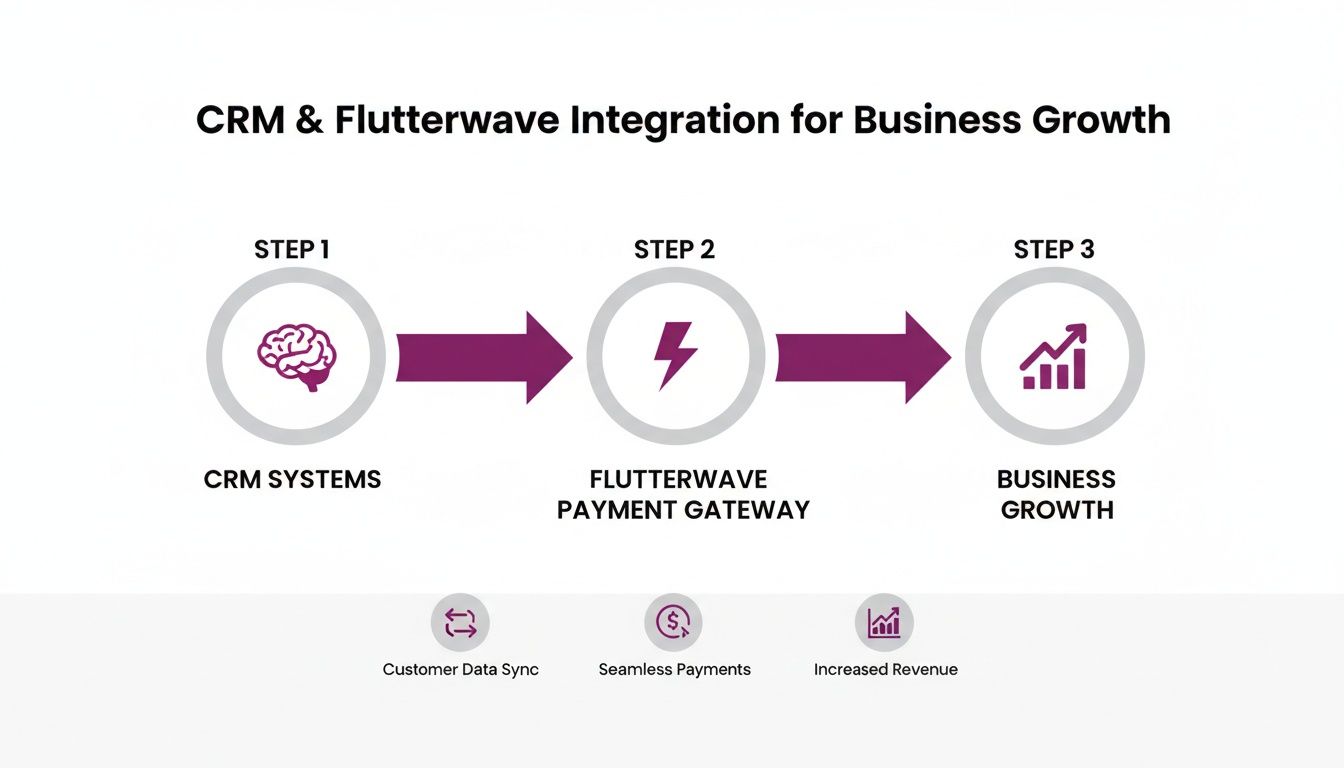
The real magic here is the automated, two-way conversation that happens behind the scenes. It turns two separate tools into a single, intelligent system for managing your customer from their first hello to their latest payment.
The Technical Connection
So, how does this data exchange actually happen? It's all made possible by something called an Application Programming Interface, or API.
Think of an API as a waiter in a busy restaurant. Your CRM (the customer at the table) gives an order, like "create a payment link for this invoice." The API (the waiter) takes that request to Flutterwave (the kitchen), then brings the result—the payment link—right back to the CRM.
This kind of automation is what unlocks some seriously powerful features:
- One-Click Payments: Invoices sent from your CRM can now include a direct payment link. Your clients can settle up instantly using their card, a bank transfer, or their favourite mobile money service.
- Automatic Reconciliation: The moment a payment is made through Flutterwave, the invoice status inside your CRM flips to ‘Paid.’ This single feature drastically cuts down on admin work and keeps your cash flow healthy.
- Enriched Customer Profiles: Every transaction adds another layer of valuable data to that customer's profile. You can see their lifetime value and buying habits at a glance, helping you make smarter business decisions.
This kind of synergy is becoming more and more crucial for businesses. For instance, the CRM software market in Egypt is on track to hit US$76.70m in 2025. This explosive growth is happening at the same time as Flutterwave's expansion, creating the perfect storm for businesses ready to get serious about their customer data.
A Unified Hub for Business Operations
When you bring it all together, a CRM with Flutterwave becomes a central command centre for your entire business. It directly connects your sales and relationship management efforts to the money you're collecting.
And it doesn't have to stop at payments. A truly complete system can also benefit from integrating other communication channels like WhatsApp with CRM, pulling every customer conversation into one place.
This integrated approach is especially game-changing for local payment methods. To see just how powerful it can be, take a look at our guide on how a CRM with mobile money integration can streamline your operations across the continent.
Core Benefits of Integrating Flutterwave with Your CRM
Let's be clear: connecting your CRM with Flutterwave is more than just a technical tick-box exercise. It's a strategic move that delivers real, measurable advantages to your bottom line and, just as importantly, to your customer relationships. The biggest win? You finally get that elusive 360-degree view of your customer.
Think about it. Right now, your customer conversations are probably in one place, and their payment records are in another. This integration smashes those silos together. Suddenly, a customer's entire payment history—every single invoice paid, subscription renewed, or refund processed—sits right next to their support tickets and sales emails. This complete picture is the bedrock of smarter, faster business decisions.
Supercharge Your Operational Efficiency
One of the first things you'll notice is how much tedious financial admin simply disappears. Manually creating invoices and reconciling payments isn't just a drain on time; it's a minefield for human error. Those little mistakes can lead to delayed payments and seriously frustrated customers.
A CRM with Flutterwave puts these painful processes on autopilot.
- Automated Invoicing: You can generate and fire off professional invoices straight from your CRM. The best part? They can include one-click payment links, making it ridiculously easy for clients to pay you on the spot.
- Instant Reconciliation: The moment a payment comes through Flutterwave, the invoice in your CRM is automatically marked as ‘Paid’. No more manually checking bank statements against your records. This tightens up your cash flow and frees your team from grunt work.
- Reduced Admin Load: Instead of chasing payments and wrestling with spreadsheets, your team can pour their energy into what actually grows the business: selling and looking after your customers.
By automating the entire payment lifecycle, you not only get paid faster but also present a more professional and organised image to your clients. This efficiency is a key competitive advantage.
Unlock Deeper Business Intelligence
When you merge your sales and payment data, you start to uncover powerful insights that were completely invisible before. Your CRM stops being just a list of contacts and becomes a genuine business intelligence tool. It’s here that you can start understanding your customers on a much deeper level.
You can now easily segment customers by their buying habits, pinpoint your most valuable clients, or spot payment trends over a specific period. This data-driven approach means you can create marketing campaigns that are laser-focused and personal—campaigns that actually connect with your audience. Imagine being able to automatically send a special offer to your most loyal customers or a gentle nudge to clients who haven't bought anything in a while.
To give you a sense of where this is headed, just look at Flutterwave's recent H1 2025 expansion into Egypt. They're rolling out features like Next Gen APIs and pool accounts, which fundamentally change what a CRM can do with payments. For Egyptian businesses, these pool accounts mean a CRM with Flutterwave can manage client refunds, incentives, and bulk payouts without breaking a sweat—all crucial for building customer loyalty. You can track the growth of CRM software in Egypt at Statista.
Below is a quick look at how day-to-day operations change when you bring these two platforms together.
Impact of CRM and Flutterwave Integration on Business Operations
| Business Challenge | Without Integration | With CRM & Flutterwave Integration |
|---|---|---|
| Invoicing | Manual creation in Word/Excel; prone to errors and delays. | Automated invoice generation from CRM with one-click payment links. |
| Payment Tracking | Manually checking bank accounts to confirm payments. | Real-time payment status updates directly in the customer's CRM profile. |
| Customer Data | Financial history is separate from communication and support history. | A complete, unified view of all interactions and transactions in one place. |
| Team Focus | Staff spends hours on admin tasks like chasing late payments. | Team focuses on revenue-generating activities like sales and support. |
| Business Insights | Difficult to connect sales efforts with actual revenue and payment behaviour. | Clear, data-backed insights into customer lifetime value and buying patterns. |
Ultimately, this integration is about more than just convenience. It’s about building stronger, more sustainable customer relationships powered by data. For a deeper look at getting your billing process right, have a read of our guide on the benefits of free invoicing and CRM software.
Seeing Your Integrated System in Action
So, how does the link between your CRM and Flutterwave actually work in the day-to-day running of your business? Let's get practical and walk through a few common scenarios that really show off the power of this setup. These examples bring to life how automated workflows can free up your time and seriously upgrade your customer experience.
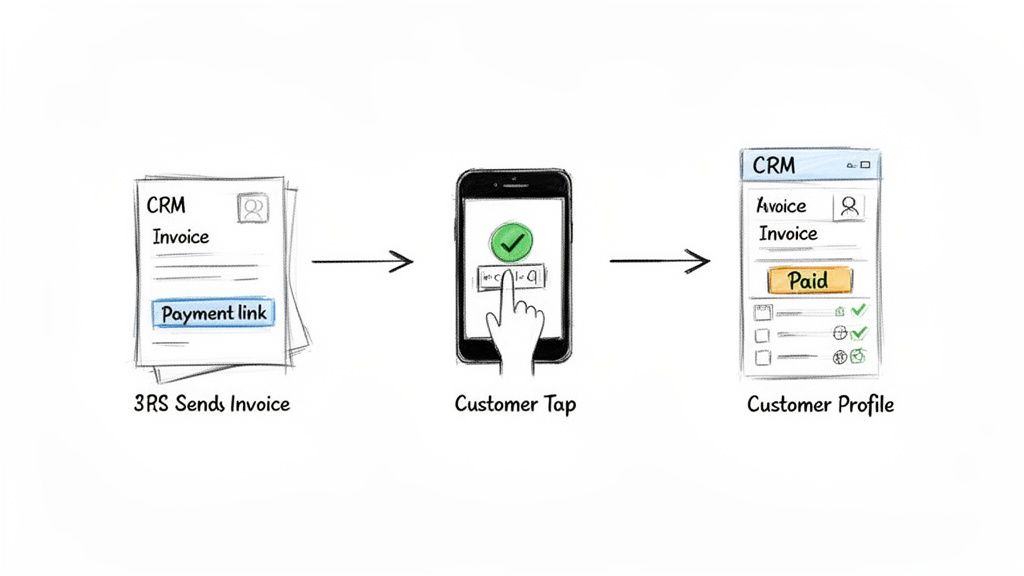
Scenario 1: Invoicing and One-Click Payments
Picture this: you’ve just wrapped up a project for a client. The old way involved manually creating a PDF invoice, attaching it to an email, and then waiting (and hoping) for a bank transfer to show up. It was a drag.
With an integrated system, your process is completely different:
-
Generate Invoice in CRM: You pull up the client’s profile in your CRM and generate a fresh invoice with a single click. All their details are already there, so you know it's accurate.
-
Embed Flutterwave Link: The system automatically pops a unique Flutterwave payment link right into the invoice email before sending it off.
-
Client Pays Instantly: Your client gets the email, clicks the link, and lands on a secure Flutterwave checkout page. They can pay in seconds using whatever method they prefer—be it a card, mobile money like M-Pesa, or a direct bank transfer.
-
Automatic Reconciliation: The second the payment goes through, Flutterwave sends a signal back to your CRM. Just like that, the invoice status flips from ‘Sent’ to ‘Paid’. You didn't have to lift a finger.
This seamless loop is what we call automated payment reconciliation. It connects the dots between sending a bill and getting paid, cutting down the hours spent chasing payments and manually updating your books. The result? Healthier, more predictable cash flow.
Scenario 2: Subscription and Recurring Billing
For any business running on a subscription model—think a Software-as-a-Service (SaaS) company, a digital agency with monthly retainers, or a media publication—billing is a constant, manual headache.
A CRM with Flutterwave changes the game. When a new customer signs up, Flutterwave securely tokenises their payment details. From then on, your CRM automatically triggers recurring payments based on the schedule you’ve set, whether it's monthly or annually.
Every successful payment is logged against that customer's profile in the CRM, no questions asked. And if a payment happens to fail? The system can be set up to automatically ping both your team and the customer, kicking off a process to recover the payment. It’s a hands-off approach that guarantees consistent revenue and reduces customer churn caused by simple payment hiccups.
Scenario 3: E-commerce Sales and Customer Insights
When an e-commerce store uses a payment gateway on its own, a sale is just a number on a dashboard. It doesn't tell you much. But when you integrate that gateway with a CRM, everything changes.
Every single purchase made through your Flutterwave-powered checkout is no longer just a transaction. It becomes a meaningful event tied directly to a specific customer's profile in your CRM.
This connection transforms simple sales data into rich customer intelligence. You can start tracking purchase frequency, average order value, and product preferences for every single customer. This lets you build incredibly detailed segments for marketing campaigns that actually hit the mark.
This integration also broadens what you can do operationally. For instance, when Flutterwave launched its Send App in Egypt in July 2025, it was a big deal for cross-border remittances—something that directly feeds back into CRM capabilities. Businesses can now use this feature for reliable payouts, like issuing refunds or paying suppliers, straight from their CRM. It's another way to keep clients happy and your operations smooth. You can learn more about how Flutterwave's Send App is unlocking seamless remittances.
Choosing the Right Integrated Solution for Your Business
Making the jump to an integrated system is a big step, but a bit of planning makes all the difference. The first thing you'll need to decide is how your CRM and Flutterwave will talk to each other. You’ve got a few solid options, and the right one really depends on your business and technical setup.
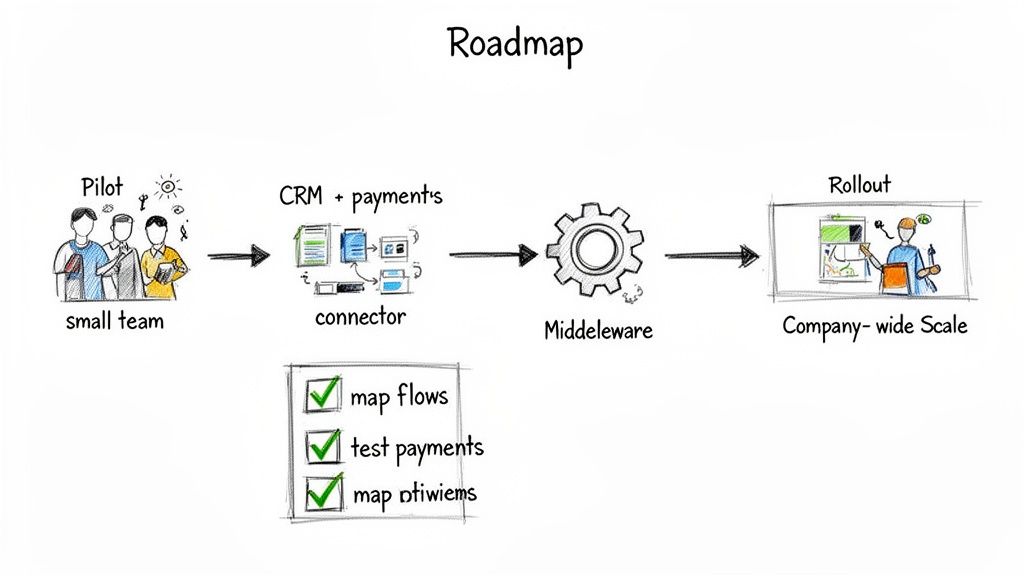
Many platforms, like ours at CRM Africa, offer a native integration. This is by far the simplest path—the connection is already built and we handle all the maintenance. No fuss.
For other CRMs, you can turn to middleware services like Zapier. Think of them as universal translators, letting the two systems communicate without you needing to write a single line of code. It's a similar approach to how businesses might integrate a CRM with Paystack, giving you a ton of flexibility. If you want to see how that works, you can check out our guide on connecting your CRM with Paystack.
Mapping Your Key Business Processes
Before you plug anything in, you need to map out your core workflows. Don't worry, this isn't a technical job; it’s about getting real about how your business actually runs from day to day. Start by asking a few key questions to figure out what a "win" looks like for this integration.
- What info needs to move? Be specific. Usually, it's customer details, invoice amounts, and payment statuses that need to flow between your CRM and Flutterwave.
- What kicks off an action? Think in terms of triggers. For instance, when a payment comes through on Flutterwave, that should automatically update the invoice status to "Paid" in your CRM.
- Who needs to see what? Not everyone needs access to everything. Your sales team probably needs to see payment statuses, but it’s your finance team that should be handling things like refunds. Define those roles.
Your process map is your blueprint. It makes sure the tech serves your business goals—not the other way around. Getting this right from the start saves a world of headaches and guarantees a setup that actually helps your team.
A Strategic Rollout Plan
Going all-in with a company-wide launch from day one is a recipe for chaos. A phased, strategic rollout is the way to go. It minimises disruption, lets you iron out wrinkles early, and builds confidence across the team.
Your Four-Step Rollout Strategy:
- Start with a Pilot Team: Grab a small, tech-friendly group from your sales or finance department to be your guinea pigs. Their real-world experience is gold.
- Test the Must-Haves: Have the pilot team run through your most critical processes. That means everything from creating an invoice and sending a payment link to seeing that payment reflected correctly in the CRM.
- Get Honest Feedback: Ask them straight up: What worked? What was a pain? Use their insights to fine-tune the setup before anyone else touches it.
- Go Wide: Once you've squashed the bugs and your pilot team is happy, you're ready. Roll out the integrated solution to the rest of the company, armed with solid training guides and support docs.
Got Questions About CRM and Flutterwave? We’ve Got Answers.
Making a strategic move like this for your business naturally brings up a few questions. And that's a good thing. Integrating your core systems is a big decision, so let’s walk through the most common queries we hear from business owners about connecting a CRM with Flutterwave.
The goal here is to clear up any lingering uncertainties you might have, giving you the confidence to decide on the best path forward for your company's growth.
Which CRMs Work Best with Flutterwave?
The good news is you have options. Lots of them. Many popular CRMs can connect with Flutterwave one way or another. Some platforms, like our very own CRM Africa, come with a native, built-in integration. This is by far the simplest, most seamless approach — it just works, right out of the box.
But what if your CRM doesn't have a direct connection? No problem. You can use middleware tools like Zapier as a bridge. Think of Zapier as a universal translator, letting your CRM and Flutterwave talk to each other without any custom coding. And for businesses with unique workflows or in-house developers, building a bespoke connection using Flutterwave’s powerful APIs is always a solid choice. The right path really boils down to your budget, your team's technical comfort, and exactly what you want to automate.
Is It Secure to Connect My CRM to a Payment Gateway?
Yes, absolutely—as long as it’s set up correctly. Security is non-negotiable, and a platform like Flutterwave is PCI-DSS Level 1 certified, which is the highest, most stringent security standard in the entire payments industry.
Here’s how it works: the integration uses secure APIs with authentication tokens. This means your CRM never actually touches or stores sensitive card details. When a customer pays, the whole process is handled directly on Flutterwave's encrypted servers. This dramatically minimises your risk. To keep things tight, you’ll just need to follow best practices, like being smart about who has access permissions within your CRM.
Can I Manage Mobile Money and Local Payments?
Without a doubt. In fact, this is probably the single biggest reason for African businesses to get excited. Flutterwave was built from the ground up to handle the incredible diversity of payment methods used across the continent.
This isn’t just an afterthought; it’s core to what they do. That means you can easily accept:
- Mobile Money: Services like M-Pesa and MTN Mobile Money are fully integrated.
- Bank Transfers: Customers can pay directly from their bank accounts.
- USSD: People can even complete payments using simple USSD codes on any phone.
- Cards: Of course, all major local and international cards are accepted.
The magic happens when you connect this to your CRM. A payment made via M-Pesa is recorded and reconciled against the customer's invoice just as instantly as a standard card payment. This gives you one clean, unified view of all your money, no matter how your customers choose to pay. It’s a crucial capability, as pointed out by industry resources like QloApps, which often highlight Flutterwave's strength in handling multiple currencies and payment methods.
What Kind of Business Benefits Most?
While pretty much any business that takes payments will see an upside, some businesses feel the impact almost immediately. A CRM with Flutterwave is a real game-changer for a few specific models.
Subscription businesses, like software-as-a-service (SaaS) companies or digital publishers, can put their entire recurring billing cycle on autopilot. E-commerce stores can sync sales data with customer profiles to build incredibly smart, personalised marketing campaigns. And professional service providers—think consultants, agencies, and freelancers—can slash the hours spent chasing invoices and manually reconciling payments.
Put simply, if your business deals with a lot of transactions or you're losing time to the soul-crushing admin of manual payment tracking, this kind of integration will change how you work.
Ready to see how an all-in-one platform can streamline your sales, projects, and payments? CRM Africa combines a powerful CRM with native Flutterwave integration, client portals, and project management tools—all in one place. Get started for free and discover a smarter way to grow your business. Schedule your free demo today!