If you're an SME or agency owner, you've probably asked yourself how to manage clients, their invoices, and tasks in one place. The simple answer? You need to bring everything under one roof with a unified platform. This isn't just about ditching the dozen apps you're juggling; it's about stopping revenue leaks and escaping administrative chaos by connecting your client records, project management, and invoicing into a single, cohesive system.
Why a Unified CRM Is No Longer Optional for African SMEs
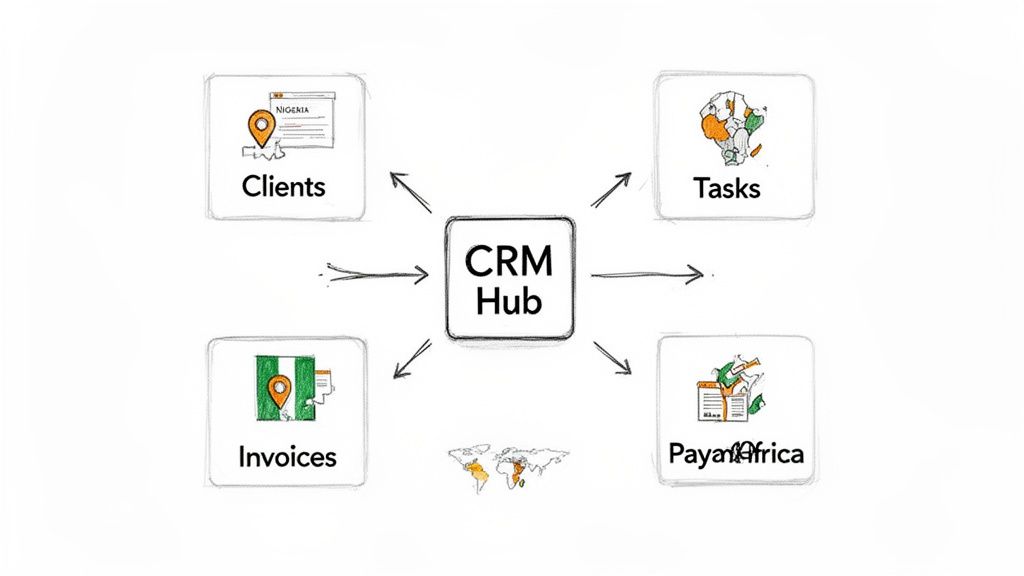
For growing businesses in Nigeria, Kenya, and South Africa, the daily operational mess is a familiar story. You're tracking client conversations in your email, managing projects on spreadsheets, and creating invoices with yet another tool. Sound familiar? This fragmented approach isn't just inefficient; it’s a direct threat to your bottom line.
The truth is, disconnected systems create serious bottlenecks. Information gets lost in the shuffle, deadlines are missed, and invoices are sent late—or worse, forgotten completely. This administrative drag slows down your ability to deliver quality work and scale in markets that are more competitive than ever. A study by Nucleus Research found that CRM systems can return $8.71 for every dollar spent (Nucleus Research, 2014).
The True Cost of Inefficiency
The financial hit from a disorganised workflow is staggering. Across Africa, the business software sector is booming, with a projected 14.5% annual increase between 2026 and 2030. This growth is being driven by SMEs desperate for all-in-one tools to fight rising operational costs.
Think about this: a recent survey found that 62% of African SMEs lose over R500,000 (roughly USD 28,000) every year just from inefficient invoicing. That makes a strong case for integrated platforms. You can dig deeper into these market trends and their impact on African businesses.
Adopting a unified CRM has moved from a "nice-to-have" to a core survival strategy. It gives you a single source of truth where every client interaction, task, and payment is visible and connected. This immediately starts solving your most critical pain points. Research from HubSpot indicates that 61% of over-performing leaders use a CRM to automate parts of their sales process (HubSpot, 2020).
Let's look at the practical differences between running your business with a patchwork of tools versus a single, integrated CRM.
Fragmented vs Unified Workflow: A Comparison
| Business Function | Fragmented Tools (Spreadsheets, Email, etc.) | Unified CRM (e.g., CRM Africa, Zoho, HubSpot) |
|---|---|---|
| Client Onboarding | Manual data entry across multiple systems. High risk of errors and lost info. | Client data captured once, populating projects, invoices, and comms automatically. |
| Task Management | Tasks assigned via email or chat. No central view of who is doing what. | Tasks linked directly to client projects and deadlines. Full team visibility. |
| Invoicing | Manually creating invoices in separate software. Difficult to track payment status. | Invoices are generated automatically from proposals or project milestones. Real-time payment tracking. |
| Client Communication | Conversations are scattered across email, WhatsApp, and call logs. No single history. | All emails, notes, and call logs are attached to the client's record. A complete history in one place. |
| Reporting | Manually pulling data from different sources to build reports. Time-consuming and often inaccurate. | Dashboards provide instant, real-time KPIs on sales, project profitability, and cash flow. |
The table makes it pretty clear. One path leads to constant manual work and missed opportunities, while the other paves the way for automation and control.
From Fragmented Chaos to Unified Control
Imagine this scenario: a client signs your proposal. In a fragmented setup, you now have to manually create a project in your task tool, assign out the work, set up client folders in your cloud storage, and then stick a reminder in your calendar to create an invoice later. Every single step is a chance for something to go wrong.
Now, let's try that again with a unified approach. When a client accepts a proposal inside the CRM:
- A new project is automatically created from a pre-set template.
- Tasks are instantly assigned to team members with clear deadlines.
- An invoice is generated and scheduled for delivery without you lifting a finger.
This level of integration shifts your workflow from reactive to proactive. Instead of your team spending hours on admin, they can focus on what actually grows the business—serving clients. As highlighted by Forbes, businesses using CRM see sales productivity increase by up to 34% (Forbes, 2017).
A unified CRM acts as the central nervous system for your business. It connects every department and function, ensuring that sales, project management, and finance are all working from the same real-time data.
Platforms like CRM Africa, Zoho, and HubSpot were built to solve this exact problem. They offer integrated solutions that bring client management, project delivery, and financial tracking under one roof. By choosing a system that consolidates these functions, you’re not just buying software; you’re investing in a more resilient and scalable business model ready for the dynamic African market.
Building Your Centralized Business Hub
Let's be real. Moving from a chaotic mix of spreadsheets, email threads, and sticky notes to a single, organised system is the first major leap you'll take. It's about more than just buying software; you're building the foundation for how your entire business will run from now on. The goal is to create one central spot where every client detail, every task, and every invoice can live together without causing a headache.
Your first big decision is picking the right platform. It's tempting to go straight for the international giants like Zoho CRM or HubSpot. They're powerful and can scale with you, no doubt. But it's worth taking a serious look at platforms built specifically with the African market in mind. For example, a tool like CRM Africa is designed to tackle local challenges head-on, and their free-forever plan means small teams can get started without any financial risk.
Kicking Off Your CRM Setup
Getting started can feel like a mountain of a task, but if you break it down, it's totally manageable. I always tell people to focus on three core things right away: getting your client data in, setting up your sales pipeline, and creating templates for your projects. Nail these, and you'll feel the benefits almost immediately.
First up, your client data. This list is the lifeblood of your business. Don't just do a messy copy-paste from your spreadsheet. Modern CRMs have structured tools to make this clean and simple.
- Clean your data first. Before you even think about uploading, spend some time in your spreadsheet. Make sure your columns match standard CRM fields (e.g., "First Name," "Email," "Company"). Get rid of duplicates and fix those annoying typos.
- Use a CSV file. Nearly every platform, including CRM Africa, Zoho, and HubSpot, prefers CSV (Comma-Separated Values) files. It’s the universal language for this kind of data transfer and keeps everything perfectly structured.
- Map your fields. When you upload, the CRM will ask you to "map" your spreadsheet columns to its fields. This is just a matching game to make sure the "Company Name" column from your sheet ends up in the "Company Name" field in the CRM.
A clean data import is the bedrock of your CRM. I can't stress this enough. Taking an extra hour to organise your client list now will save you hundreds of hours of frustration later. It means your reports, emails, and automations will actually be accurate from day one.
In the South African market, this kind of control is becoming essential. Late payments plague a staggering 68% of businesses, a problem that can absolutely cripple cash flow. We're seeing a huge demand for platforms that pull everything—from task assignments to invoice tracking—under one roof. Some agencies I've worked with have cut their admin time by up to 40% just by making this switch. You can dig deeper into these CRM system market trends and insights if you're curious.
Visualising Your Sales and Project Workflow
Once your clients are in the system, it’s time to map out how you actually work. A sales pipeline gives you a clear, visual journey of how a lead becomes a paying customer. Most CRMs use a Kanban-style board, which is perfect for this.
For a typical service business, a pipeline might look something like this:
- New Lead: A potential client gets in touch.
- Contact Made: You’ve had the first conversation.
- Proposal Sent: The quote is in their hands.
- Negotiation: You're talking scope and price.
- Won/Lost: The deal is sealed (or not).
A Nigerian software firm, for instance, could set up its pipeline in CRM Africa to automatically shift a lead to the "Proposal Sent" stage the moment a proposal is generated and emailed from the system. It's a simple automation, but it gives everyone instant clarity on where every single deal stands.
Next, you'll want to create templates for your repeatable services. If you're a Kenyan marketing agency running social media campaigns, you probably do a similar set of tasks for every new client. Instead of typing out that to-do list every time, build a project template.
Here’s what a template for a campaign setup could look like:
- Task 1: Client Onboarding Call
- Task 2: Create Project Brief
- Task 3: Develop Content Calendar (Assigned to Content Manager)
- Task 4: Design Initial Creatives (Assigned to Designer)
- Task 5: Client Review and Approval
With a template like this, the second a deal is marked "Won," you can spin up a new project, and all the tasks, assignments, and deadlines are pre-filled. It standardises your work and makes sure nothing slips through the cracks. According to the Project Management Institute (PMI), organisations that use standardized practices see 68% of their projects meet original goals and business intent, compared to 53% for those that don't (PMI, 2018).
The final piece of this initial setup is getting your team on board. Don't just send an invite link and hope for the best. Hold a short training session. Most platforms offer tutorials or let you schedule a guided demo.
Here's the demo booking page for CRM Africa—a simple way to walk your team through the platform.
Booking a session like this is a small step, but it helps make sure your team understands how the new system fits into their daily work. It turns the CRM from "just another login" into a tool they actually use to collaborate, which is crucial for making this whole central hub idea work.
Putting Your Workflows on Autopilot for Perfect Project Delivery
Once you've got your CRM set up as your business's central command centre, the real magic begins with automation. This is the point where you stop just storing information and start making it work for you. Smart workflows are your secret weapon against repetitive admin, dropped balls, and inconsistent client experiences.
The whole idea is to create simple "if this, then that" rules that run in the background. This is the absolute core of figuring out how to manage clients, their invoices, and tasks in one CRM. Instead of someone having to manually push things along, the system does the heavy lifting, freeing up your team to do the work that actually makes you money.
This diagram gives you a bird's-eye view of getting your CRM ready for automation. It boils down to getting your data in, sorting out your settings, and building out your templates.
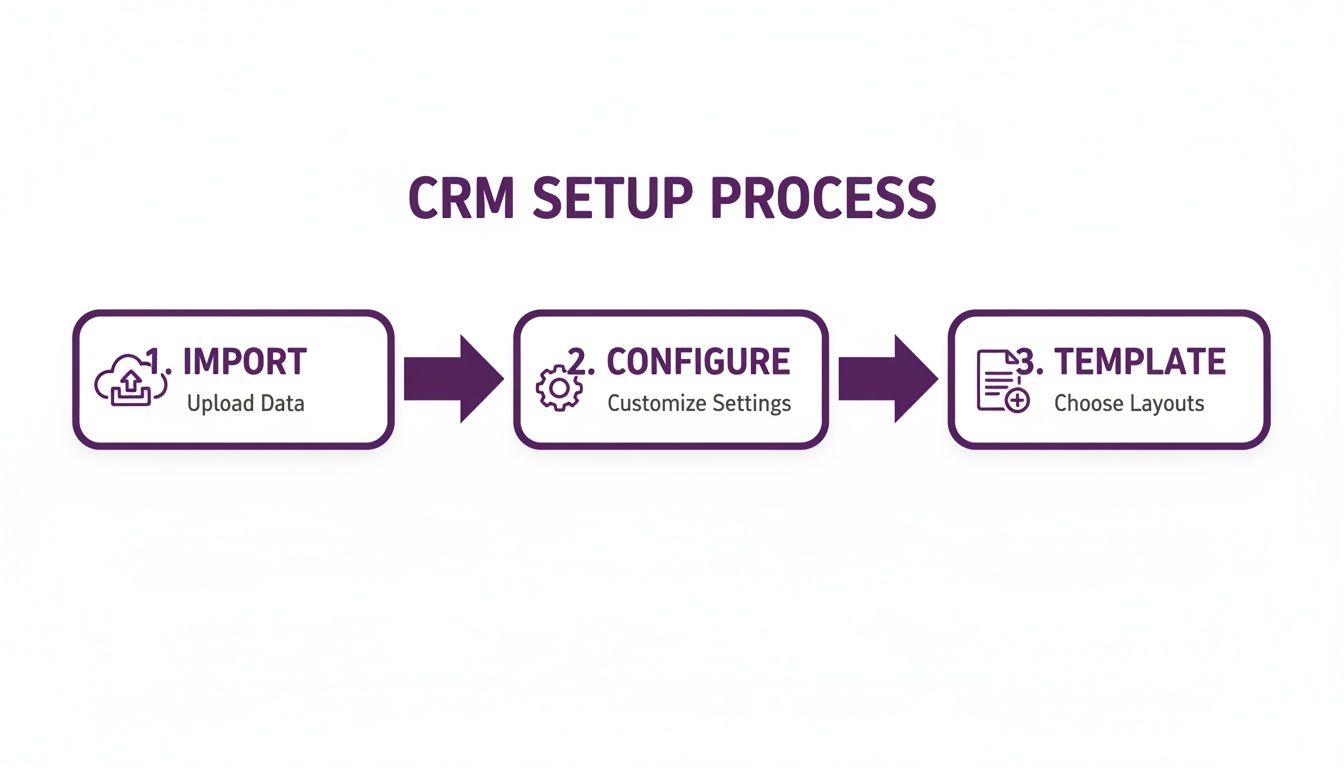
Nailing these three things—clean data, smart configurations, and reusable templates—is what lets you build powerful automations that can practically run your operations for you.
Designing Your First Automation Rule
Let's dive into a real-world scenario that every service business faces: a new client signing a proposal. In a manual setup, this kicks off a frantic scramble of admin tasks. With a solid workflow, it's just a single, powerful trigger.
Think about an IT consultancy in Ghana that has to stick to strict Service Level Agreements (SLAs). When a client clicks "Accept" on a proposal inside their CRM, a rule can be set to instantly:
- Spin up a new project using their "New Client Onboarding" template.
- Populate that project with a task list, with items like "Schedule Kick-off Call" and "Configure Client Servers" already assigned to the right people with the right due dates.
- Shoot off a welcome email to the client, introducing their project manager and giving them a link to their new client portal.
That one trigger just saved hours of manual work and ensures the project starts perfectly, every single time. Most modern CRMs like CRM Africa, Method CRM, and Insightly have user-friendly automation builders to make this happen without needing to write any code.
By taking routine admin and project setup off your team's plate, you drastically cut down on manual effort. It’s not just about being more efficient; it's about delivering a consistent, professional service from the exact moment a deal is won.
See Your Entire Workflow with Kanban Boards
Automation isn't just for behind-the-scenes tasks; it's also about making progress visible to everyone. This is where a Kanban board comes in. It’s a simple, visual way to track work as it moves through stages like "To Do," "In Progress," and "Completed."
When you hook this up to your CRM, the Kanban board transforms into a living, breathing dashboard for your entire business. Your team can see what's on their plate at a glance, and you get an instant overview of every project's health. Some platforms even let you share a simplified version with your clients in their portal, giving them the transparency they crave without them having to constantly ask for updates.
- For your team: It makes workloads crystal clear and helps spot bottlenecks before they turn into fires.
- For your clients: It builds immense trust by giving them a clear line of sight into how their project is progressing.
- For you: It's an instant health check on all active projects, helping you allocate resources where they're needed most.
This visual way of working gets you out of messy spreadsheets and endless email chains for good. You have one source of truth that's always up to date, making your whole operation far more scalable and organised. Automating how tasks get created and visualising how they get done—that's the recipe for flawless delivery.
Getting Paid Faster: Centralising Your Invoicing and Payments
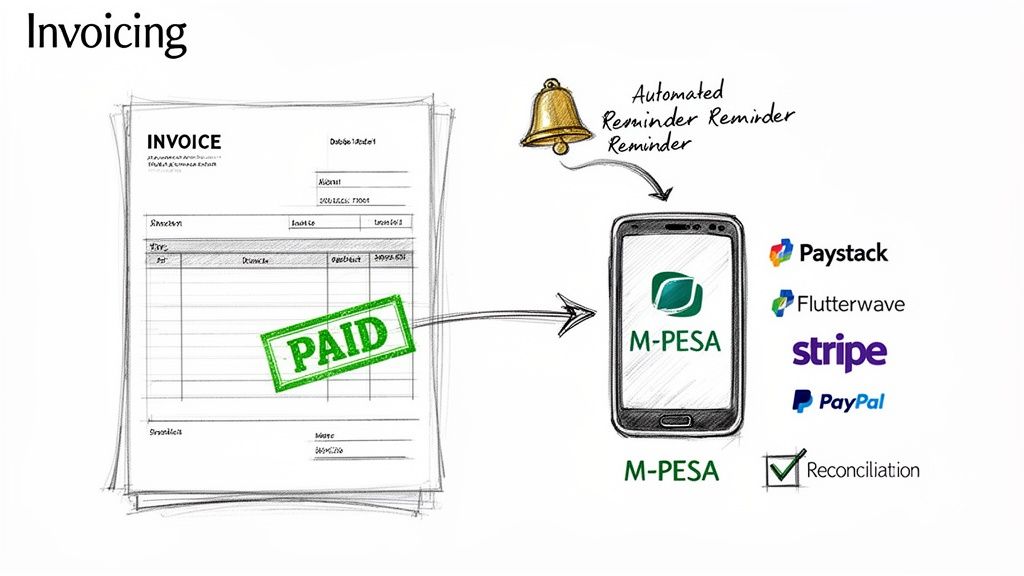
Let’s be honest: getting paid on time is the single biggest stressor for most small businesses and agencies. The gap between finishing the work and seeing the money actually hit your bank account can bring everything to a grinding halt. When you bring your invoicing and payments into your CRM, you’re not just saving time; you’re directly tackling your cash flow problems.
This is where having an all-in-one system really starts to pay dividends. It finally connects the dots between the work you’ve done and the revenue you earn. When your timesheets, project milestones, and client details all live in one place, creating an accurate, professional invoice stops being a dreaded monthly task. It becomes a simple click.
From Tracked Time to Paid Invoice—Instantly
Think about your current process. You’ve just hit a major project milestone. Now, you have to dig up a spreadsheet, manually add up hours, find the client’s agreed-upon rate, and then piece together an invoice in a completely separate tool like Word or Excel. It’s tedious, and it’s a recipe for mistakes that can cost you money.
With a properly set-up CRM, this entire headache disappears. Your team is already logging their time against specific tasks and projects right inside the system. That means you have a perfect, billable record just waiting for you.
- Turn timesheets into invoices: With one click, you can pull all billable hours directly into a detailed, itemised invoice. No more manual calculations.
- Bill on milestones: Set up your project templates so that when a specific stage is marked "complete," an invoice is automatically generated and sent.
- Automate recurring invoices: For your retainer clients, you can set up recurring invoices to go out on the first of every month like clockwork, without you ever lifting a finger.
For any service-based business, this isn't just a small improvement—it's transformative. You get to spend less time buried in billing admin and more time actually delivering great work for your clients.
Offer the Payment Gateways Your Clients Actually Use
Sending the invoice is just step one. The real goal is getting it paid, and fast. To do that, you have to make it incredibly easy for your clients to pay you, which means meeting them where they are.
This is absolutely critical for any business working across the continent. A client in Nigeria will likely want to pay you through Paystack or Flutterwave, while an international client may prefer Stripe or PayPal. Your CRM needs to handle them all seamlessly.
The rule is simple: the easier you make it for someone to pay you, the faster you get your money. Just by offering multiple, familiar payment options directly on the invoice itself, you can shrink your payment cycle from weeks to days.
Platforms designed for our market, like CRM Africa, or even global players like Zoho and Odoo, are great at this because they offer a wide range of payment integrations out of the box. It removes the friction and excuses, ensuring you get paid no matter where your client is based.
Don’t Forget About Mobile Money
In many parts of Africa, especially East Africa, mobile money isn’t just an option—it’s the default way people do business. If you’re working with clients in Kenya or its neighbours, being able to accept payments through M-PESA is non-negotiable. According to the GSMA, sub-Saharan Africa accounted for 70% of the world's $1 trillion in mobile money transactions in 2021 (GSMA, 2022).
A good CRM built with the African market in mind will have this baked right in. Your client receives their invoice via email and can pay it in a few taps from their phone. It’s the definition of a frictionless experience, and it removes one of the biggest barriers to prompt payment.
Let the System Chase Late Payments for You
Nobody enjoys chasing clients for late payments. It's awkward, uncomfortable, and can put a real strain on an otherwise great relationship. This is another painful task a unified CRM can completely automate for you.
You can create a simple workflow that sends out polite, professional reminders on a schedule you define. For instance:
- A gentle reminder is sent 3 days before the invoice is due.
- A second notice goes out on the due date.
- A firmer follow-up is sent 7 days after the due date.
This automated "chasing" keeps your accounts receivable healthy without you having to play bad cop. And the best part? Once the client pays through one of the integrated gateways, the system automatically marks the invoice as paid and reconciles the payment. You get a complete, real-time view of your cash flow without touching a spreadsheet.
The need for this is clear. The South African CRM market is part of a continental boom expected to hit USD 98.84 billion globally by 2026. Here at home, a staggering 71% of professional services firms say they're held back by disconnected tools, leading to a 35% loss in productivity. Platforms like CRM Africa are built to solve this exact problem, letting firms deliver projects 28% faster by connecting everything from the proposal to the final, paid invoice. You can learn more about the African CRM software market growth and its local impact.
Give Your Clients a VIP Experience with a Branded Portal
Getting your internal house in order with a unified CRM is a massive win. But while smooth internal workflows are great, the real magic happens when you extend that slick experience to your clients. This is where you build trust, offer radical transparency, and make your business look incredibly polished.
Enter the branded client portal. This is your secret weapon. It’s a secure, centralised hub that turns the usual chaos of email threads, shared folders, and missed calls into a streamlined, collaborative space. It finally answers the question of how to manage clients, their invoices, and tasks in one CRM by bringing your client directly into that single source of truth.
Think about it. Instead of forcing your client to create yet another password for some random project tool you use, you give them one easy-to-access place. A place that has your logo and your colours. It feels like an extension of your business, creating a professional, seamless experience from the moment they sign on.
Crafting Your Branded Client Hub
At its core, a client portal is just a private, secure website built exclusively for your client. Inside this hub, they can do everything from checking on project progress to paying an invoice, all without ever leaving a space that feels like it belongs to you. It's a huge step up from slinging files over email or giving them a login to a generic, third-party tool.
Here’s a taste of what a well-configured portal can do for your client relationships:
- Total Project Transparency: Give clients a real-time window into task lists and project milestones. They can see what’s done, what’s in progress, and what’s coming up next. This alone dramatically cuts down on all those "just checking in" emails.
- One Place for All Files: All contracts, proposals, design mock-ups, and reports live in one tidy spot. No more frantic searches through old email threads trying to find that one specific document from three months ago.
- Effortless Invoicing & Payments: Clients can view, download, and pay their invoices right inside the portal using the payment gateways you've integrated. Simple.
- Clear, Organised Communication: A dedicated messaging feature keeps every project-related conversation organised and attached to the client's record.
This level of self-service and transparency is empowering for your clients. They feel less like customers and more like genuine partners in the project, which is a powerful way to keep them coming back. In my experience, a good client portal is a key differentiator for service businesses because it makes collaboration and document sharing dead simple.
A branded client portal transforms the client relationship from a series of transactions into a collaborative partnership. It shows you value their time and are committed to transparency, building a level of trust that keeps them coming back.
Comparing Client Portal Features
Not all CRMs are created equal when it comes to their client portals. The level of customisation and the features on offer can vary wildly. When you're looking at your options, think about what truly matters for your client's experience.
| Feature | CRM Africa | Zoho Projects | Odoo |
|---|---|---|---|
| Branding | Full white-labelling with your logo, colours, and custom domain. | Some customisation, but Zoho branding is often still visible. | Customisable, but can require a fair bit of technical work to fully brand. |
| Client Access | Magic link access—no password required for the client. | Clients must create and manage a user account. | Requires user account setup, which adds friction for the client. |
| Functionality | View tasks, share files, approve documents, access invoices, make payments, and message the team. | Strong project management views, file sharing, and forums for discussion. | Integrated with accounting and project modules, offering broad but complex functionality. |
For many SMEs in Africa, a platform like CRM Africa hits the sweet spot. It's built for exactly this kind of client interaction, giving you a password-free, fully branded experience that feels custom-made for your business.
While powerful tools like Zoho and Odoo also have portals, they often force clients to create and remember yet another login. That might seem like a small thing, but any bit of friction can detract from the experience. Making it effortless is the name of the game.
Using Data to Drive Real Growth
Beyond the shiny client-facing features, a truly unified CRM gives you something incredibly valuable: data. You can finally build dashboards that pull information from every corner of your business, giving you a 360-degree view of your operations. Gartner predicts that by 2025, 60% of B2B sales organizations will transition from experience- and intuition-based selling to data-driven selling (Gartner, 2020).
Here are a few of the key metrics I always recommend tracking:
- Client Profitability: See which clients are actually your most valuable by comparing the total revenue against the time and resources you've invested in them.
- Project Completion Rates: Keep an eye on how consistently you're delivering projects on time and on budget.
- Average Payment Time: Track how long it takes for invoices to get paid. This helps you spot bottlenecks in your cash flow cycle.
This is what allows you to make decisions based on facts, not just gut feelings. You can spot which services are your cash cows, where your team is most efficient, and which clients you need to pour your energy into retaining. That's how you build a business that lasts.
Your Top Questions About All-in-One CRMs Answered
Even after you've got the perfect system up and running, real-world questions always find a way to pop up. Once the daily grind begins, you start to wonder if you're truly getting the most out of your new setup. This is where we tackle those common hurdles head-on.
I've gathered the most frequent questions I hear from SMEs across Africa after they've launched an all-in-one CRM. My goal is to give you direct, practical answers to help you master how to manage clients, their invoices, and tasks in one CRM and really see that investment pay off.
Which CRM Is Actually Best for a Small Business in Africa?
This is the big one, isn't it? The honest answer is: it depends on what your business needs. But there are a few non-negotiables for operating in our market.
You absolutely need multi-currency support, especially for key currencies like the South African Rand (ZAR), Nigerian Naira (NGN), and Kenyan Shilling (KES). More importantly, the CRM must play nice with local payment gateways. If it doesn't have native integrations with Paystack and Flutterwave, or mobile money options like M-PESA, you’re just creating more work for yourself.
Some platforms, like CRM Africa, were built from the ground up for this very reason. Of course, you can also look at international players like Zoho or HubSpot, which have a solid local presence. Just be sure to weigh your budget against the features you can't live without. A report by Software Advice found that 74% of users said their CRM system gave them improved access to customer data (Software Advice, 2015).
How Secure Is My Data in a Cloud-Based CRM?
A totally valid and important question. Handing over client data can feel like a big leap of faith. The good news is that reputable CRM providers pour huge resources into security—far more than a small business could afford on its own.
Think of it this way, their entire business model rests on keeping your data safe. They typically provide:
- Data Encryption: Your information is scrambled both while it's travelling over the internet and when it's stored on their servers.
- Regular Backups: They constantly make copies of your data, so nothing is lost if a server fails.
- Secure Data Centres: These are physical fortresses with controlled access and top-tier environmental protections.
When you're shopping around, check for compliance with standards like GDPR. It’s a high benchmark for data privacy. And for your own peace of mind, make sure you enable two-factor authentication (2FA) for your whole team. It’s a simple click that makes a massive difference.
Can I Really Manage Multiple Currencies for International Clients?
Absolutely, and if you have clients outside your own country, this is a must-have. Modern CRMs designed for pan-African or global business handle this beautifully. You can set a default currency for each client, so they always get invoices in the currency they expect.
In practice, this means you can:
- Shoot off an invoice in Nigerian Naira to a client in Lagos and another in US Dollars to a client in New York, all from the same dashboard.
- Let the system handle the exchange rate conversions automatically.
- Easily reconcile payments without pulling your hair out over currency fluctuations.
For consultants, agencies, and freelancers, this is a game-changer. It smooths out the payment process and makes you look incredibly professional.
I always advise clients to start with automations that tackle high-frequency, low-value tasks. These are the repetitive jobs that consume hours each week but don't directly generate revenue. Getting these off your plate provides an immediate and noticeable boost in productivity.
What Should I Automate First for the Biggest Impact?
It's tempting to try and automate everything at once, but that's a recipe for overwhelm. For a quick and satisfying win, focus on the small, repetitive tasks that slowly drain your day.
Here are three automations I recommend setting up right away:
- New Client Onboarding: The second you add a new client, trigger a workflow that sends a welcome email and creates your standard project task list. It guarantees every client gets the same polished, professional start.
- Proposal and Quote Follow-ups: Don't let good leads go cold. Set up a simple automated sequence to send a friendly nudge to anyone who hasn't responded to a proposal after a few days.
- Overdue Invoice Reminders: This is the single most powerful automation for improving your cash flow. Create a series of polite-but-firm reminders for unpaid invoices. You'll be amazed at how much time you get back when you stop chasing payments manually.
Ready to stop juggling apps and start running your business from a single, powerful platform? CRM Africa brings your clients, tasks, and invoices together, so you can deliver great work and get paid faster. Start for free and centralise your business today.